
Africa Atom Multi Theme3.1 - Get APK
You'll be able to download in few seconds.
Publisher Description
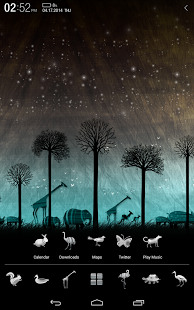
**Introducing Multi Wallpaper
Revolutionary Wallpaper that Wallpapers are switched automatically as turn the device on and off
Introducing, Atom Themes to make your Atom launcher more beautiful.
Emotionally designed themes, themes by collaboration work with famous artists, K-Pop star themes are coming soon. Please download Atom Store and experience our wonderful themes.
***How to Use
1. Install Atom Launcher if you do not have Atom Launcher on you device.
2. Push the home button (on the middle of your device) and check default, and select Atom Launcher.
3. Download themes which you want and start the application.
4. After installation, when Atom Theme Setting appears, Select a theme and check Used.
- Mult-Wallpaper: Go to Theme Setting >> Multi Wallpaper>> Select wallpapers that you wish to display
- Scroll in Folder: Enlarge Foder Size More than two-icon size>> Scroll left and right in the folder
- Add Icons to Folder : 1. Drag an icon in the folder
2. Touch a folder – toch ‘+’ mark
on the buttom-right side-Sellect
icons that you wish to add
*** Atom Theme Using TIP
- Setting the screen effect: Scroll up of the home screen dock bar to see the setting window
- Change point color: Tab and Hold (Long click) on home screen >> theme setting >> 'Change Point Color'
- Change Icons: Tab and Hold (Long click) on home screen >> theme setting >> 'Change Icon'
- Create Folder: Applications(Middle button on the home screen) >> menu on upper side >> pencil icon >> long click to application icon >> drag and drop to another icon
*** Atom Launcher’s main features
- Supports for ICS’s widgets and menu: Widgets located on upper side of screen (search bar or clock)
- Available for Changing Display Settings on Hidden Dock: Emotional Filter Effect, Various Screen Switching, Opacity Adjustment
- Available for Changes by Setting Point Color Changes: Available for Color Changes for widgets, Menu, Guide, or icons
- Live Background: Changes to dull backgrounds with dynamic backgrounds
- Wide-Range Theme Support: Wide-range theme support by Atom Launcher and also existing SSKIN and GO Launcher themes
- Icon change: Possible to use icons from other themes
*** Attention
- Available from above Android OS 4.0.2 version(supporting ICS and Jelly Bean)
- The theme application needs 20 MB in total to save theme resources.
- Because of enhancing usability, installed theme doesn’t appear
- Themes for Tab Device (X-large screen) will be available soon.
- Badge: Display missed call, unread message (Supprots only defalt apps on your Android device, Could not support the functions by devices or providers)
*** Customer Support
Please leave reviews or comments on Google play reviews
Your review will be appreciated.
For more information or support, please visit
- Facebook: http://www.facebook.com/atom.themes
- CS E-mail: atom.launcher@dlto.co.kr
About Africa Atom Multi Theme
The company that develops Africa Atom Multi Theme is DLTO. The latest version released by its developer is 3.1.
To install Africa Atom Multi Theme on your Android device, just click the green Continue To App button above to start the installation process. The app is listed on our website since 2013-12-04 and was downloaded 0 times. We have already checked if the download link is safe, however for your own protection we recommend that you scan the downloaded app with your antivirus. Your antivirus may detect the Africa Atom Multi Theme as malware as malware if the download link to com.dlto.atom.africa is broken.
How to install Africa Atom Multi Theme on your Android device:
- Click on the Continue To App button on our website. This will redirect you to Google Play.
- Once the Africa Atom Multi Theme is shown in the Google Play listing of your Android device, you can start its download and installation. Tap on the Install button located below the search bar and to the right of the app icon.
- A pop-up window with the permissions required by Africa Atom Multi Theme will be shown. Click on Accept to continue the process.
- Africa Atom Multi Theme will be downloaded onto your device, displaying a progress. Once the download completes, the installation will start and you'll get a notification after the installation is finished.
Program Details
System requirements
Download information
Pricing
Version History
version 3.1
posted on 2013-12-04
version 3.0
posted on 2013-03-18
Several fixes and updates
Disclaimer
External Download
We do not host Africa Atom Multi Theme on our servers. We did not scan it for viruses, adware, spyware or other type of malware. This app is hosted by Galad and passed their terms and conditions to be listed there. We recommend caution when installing it.
The APK Download link for Africa Atom Multi Theme is provided to you by apps112.com without any warranties, representations or guarantees of any kind, so access it at your own risk.
If you have questions regarding this particular app contact the publisher directly. For questions about the functionalities of apps112.com contact us.
